Epson Setting Assistant: Automatic Image Correction for Projected Images
Epson Setting Assistant is an app developed by Seiko Epson Corporation for Android devices. This free app is designed to automatically correct the shape of a projected image by taking pictures with your device's camera. Whether you're using a home projector or a business projector, Epson Setting Assistant can help you achieve the best image quality.
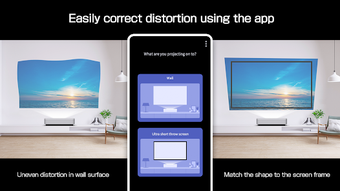
The main features of Epson Setting Assistant include wall correction and screen correction for ultra-short-throw projection. With wall correction, the app detects unevenness in the surface of the wall and corrects distortion in the projected image. For ultra-short-throw projection, the app matches the shape of the image to the frame of the screen.
For home projector users, simply ensure that your Android device and the projector are connected to the same network. Then, follow the on-screen instructions in the app to select the appropriate correction mode and take a photo of the projected pattern. The app will automatically apply the necessary corrections.
Business projector users need to make sure that the wireless LAN power setting is turned on in the projector's management menu. After projecting a QR code, open the app on your Android device and scan the QR code to connect to the projector. Similar to the home projector setup, follow the on-screen instructions to select the correction mode and capture a photo of the projected pattern.
It's worth noting that if you're not satisfied with the automatic corrections made by the app, you have the option to manually adjust the image using the projector's remote control. Epson Setting Assistant supports a range of ultra-short-throw Epson projectors, and you can find more information on the Epson website.
Please note that any emails or inquiries sent to the developer will be used to improve future services, but individual responses cannot be provided.